
How to share screeners without losing control
Every screener you send is an act of trust. ONE gives you a different tool for each kind of share, from one password-protected video to a personal page that expires, so you never have to choose between easy for the buyer and safe for you.
In this guide
- Give each buyer a page of their own
- Lock a single video with a password
- Know whose copy it is
- Share lists with the people who are logged in
Before and after
The usual way, and the ONE way
Flip the switch to see what changes.
Link and password together
Both in the same email, valid forever.
A private link that expires
Private Video Access creates a unique URL with its own password and expiry date. Send them separately.
Register first, please
Many buyers give up at the login screen.
No login, still controlled
Anonymous Access gives that buyer a personal page with no login, a view limit and an expiry date.
WeTransfer and hope
No idea where it goes next.
Watermarked to them
Downloads are re-encoded with the buyer’s email and user ID, and the link expires after 7 days.
Anyone can watch
Indefinitely, with no record.
Contained
Logged-in links ask the next person to sign in. Expiring links stop on schedule.
How it works
Four moves
Give each buyer a page of their own
Anonymous Access sends a unique link to a personal landing page with just the content you chose. Set an expiry date and a view limit, and if they try to browse beyond what you shared they are asked to log in.
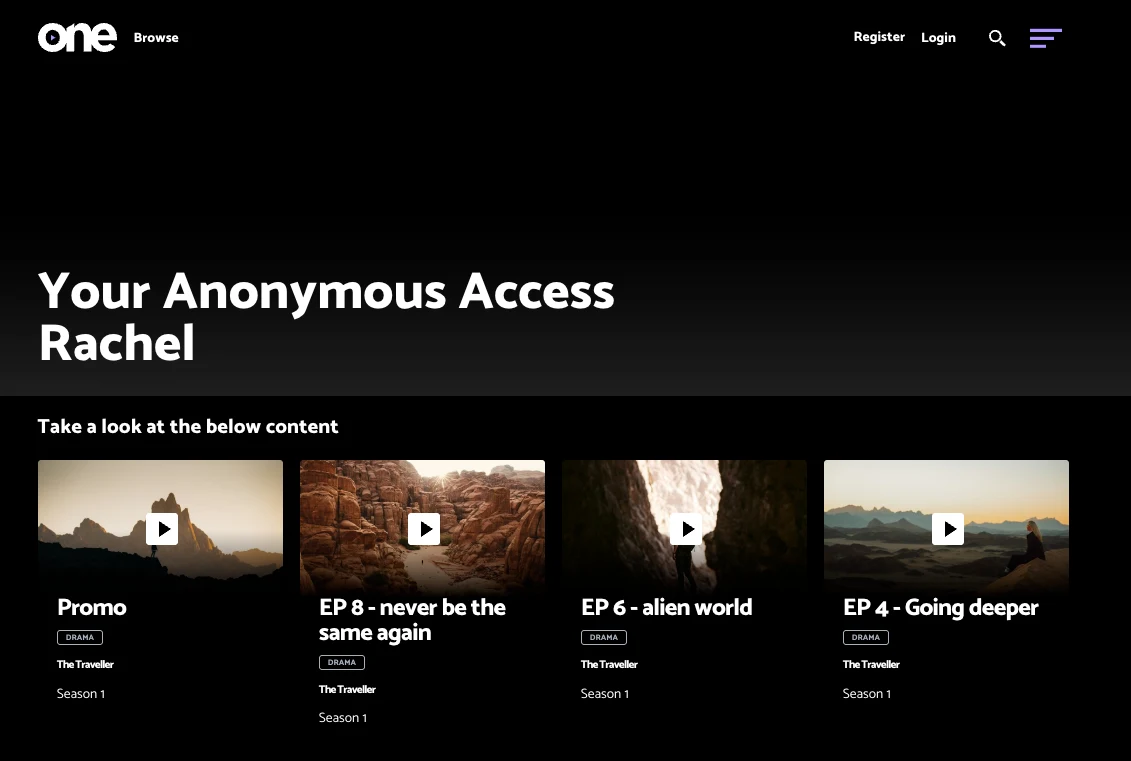
A personal Anonymous Access page, ready to watch with no login.
Lock a single video with a password
Private Video Access generates a unique URL and password with an expiry date. You can see every link you have issued and when each one expires.
Know whose copy it is
With watermarking on, website downloads carry the buyer’s email and user ID, and the link expires after 7 days. One-time download links expire as soon as they are used.
Share lists with the people who are logged in
List Share emails a selection of programmes. Logged-in buyers see what their permissions allow, and anyone else is asked to log in or sees the public view.
Questions we get asked
Before you ask
Do buyers always need an account?
No. Registered buyers sign in as normal, but Anonymous Access and Private Video Access let you share without asking them to create an account.
Can an Anonymous Access link be forwarded?
It could work until it reaches its view limit or expiry date. For sensitive titles, set a view limit of 1 and a short expiry.
Can I see whether they watched it?
Yes. Reporting shows who viewed each video and for how long, and List Reporting shows activity on the lists you share.