
How to know which buyers are serious before you call
Your best leads are already telling you what they want. They just are not saying it in email. ONE records what each buyer watched, for how long, what they downloaded and which lists they opened, then sums it up for you every month.
In this guide
- See the whole picture at a glance
- Know each buyer before you speak
- Follow every list you send
- Let the summary come to you
Before and after
The usual way, and the ONE way
Flip the switch to see what changes.
Guess from the inbox
Whoever replied last feels like the hottest lead.
Start with the data
The Reporting dashboard shows your most viewed programmes and most active buyers.
Reread the email thread
And hope you remember what they liked.
Look them up
Search the buyer to see their last login, the programmes and videos they watched and time spent.
Wait for a reply
That may never come.
See it land
List Reporting shows who opened your list and what they looked at.
Build a slide by hand
From three spreadsheets and memory.
Read the Insight
Insights writes a monthly summary for each programme, company and territory, ready to download as a PDF or email.
How it works
Four moves
See the whole picture at a glance
The dashboard shows most viewed programmes, top programmes by video views and your most active buyers, with filters and CSV export.
Know each buyer before you speak
Search any buyer to see their last login, the programmes and videos they viewed and how long they spent watching.
Follow every list you send
List Reporting tracks activity on the lists you share, so you know who engaged and when to follow up.
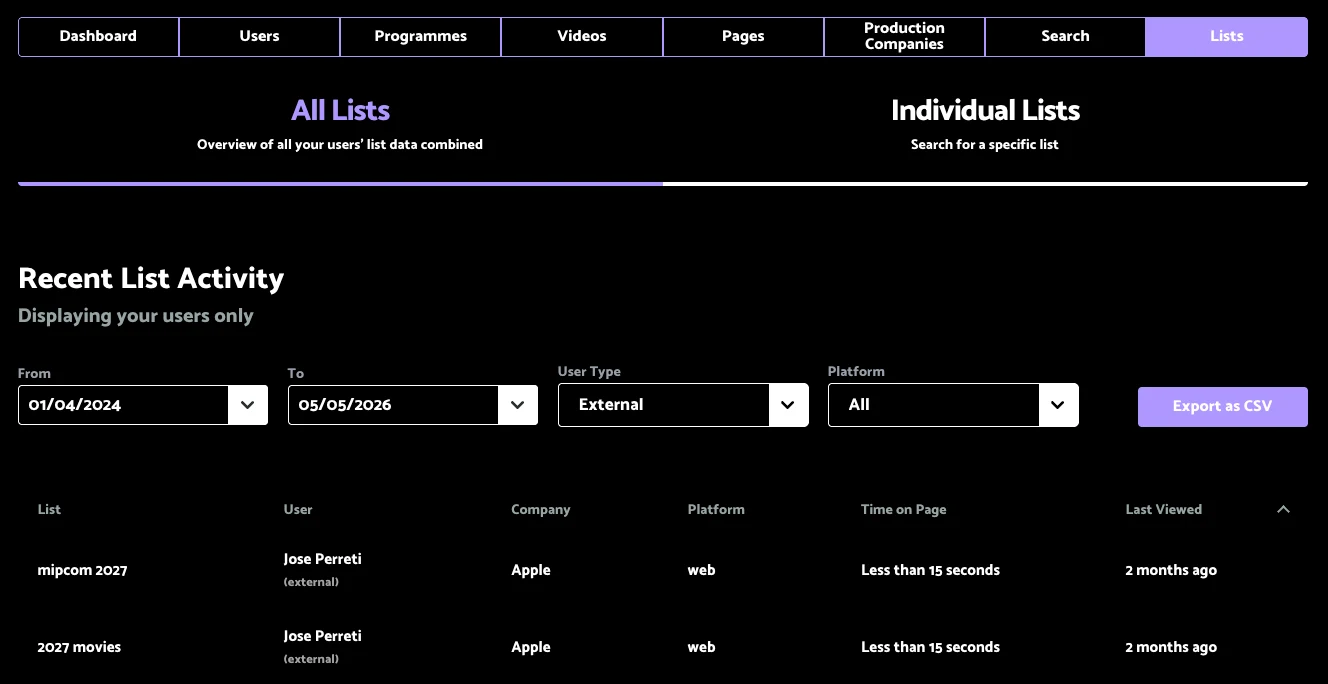
List Reporting: recent activity on the lists your team has shared.
Let the summary come to you
Each month Insights summarises engagement for every programme, company and territory. Download it as a PDF or share it by email, and assign account managers so each salesperson focuses on their own clients.
Questions we get asked
Before you ask
Can buyers see this data?
No. Reporting is for admins and the internal users you give access to.
Does it work if our videos are hosted elsewhere?
Video reporting is tied to videos hosted in ONE, which is one reason we recommend hosting with us. ONE can still work alongside an existing setup such as Brightcove.
Can I take the data elsewhere?
Yes. Reporting tables export as CSV, and Insights download as PDF.