
How to run a market from an iPad, even when the Wi-Fi dies
The buyer you have chased for six months finally sits down. The stand Wi-Fi drops. The trailer spins. This guide shows how ONE's branded sales app turns that moment into the best meeting of your day, and gets the follow-up out before they reach the next stand.
Book a demo
A market day, two ways
Same buyer. Same stand. Very different day.
Flip the switch to see what changes when every salesperson walks the floor with ONE in their bag.
Folders of files on a laptop
Screeners downloaded one by one, renamed, and checked twice in case the version is wrong.
One sync, every iPad ready
Sync the app and your catalogue, images and chosen videos are on every salesperson's iPad, in your branding.
Waiting on the Wi-Fi
The trailer link spins while the buyer checks their phone. The moment passes.
Press play, instantly
Once synced, the app works fully offline. Trailers play the second you tap them, whatever the hall Wi-Fi is doing.
Notes on a pad
What they liked lives in a notebook and in your head, competing with 30 other meetings.
The meeting is the record
Open the buyer's meeting, play the titles, take notes as you go. Nothing to type up later.
Hotel-room emails at midnight
Follow-ups get written days later, by which time the buyer has seen 40 other slates.
Follow up before the next coffee
Send the follow-up, with screener links, from the meeting's Summary tab while the conversation is still warm.
Guessing who was serious
Did they watch it? Nobody knows, so everyone gets the same chaser.
See who actually pressed play
Reporting shows who opened what you sent and how long they watched, so you chase the buyers who are leaning in.
Laptop, links, notebook, late-night emails and guesswork.
One branded app. Works offline. Follow-ups out the same day, with the data to prove who cares.
Inside the app
What your team actually sees
Every meeting, ready before you land
Meetings sync from the website with attendees, times and the list you plan to show, so the day is set out before the stand opens.
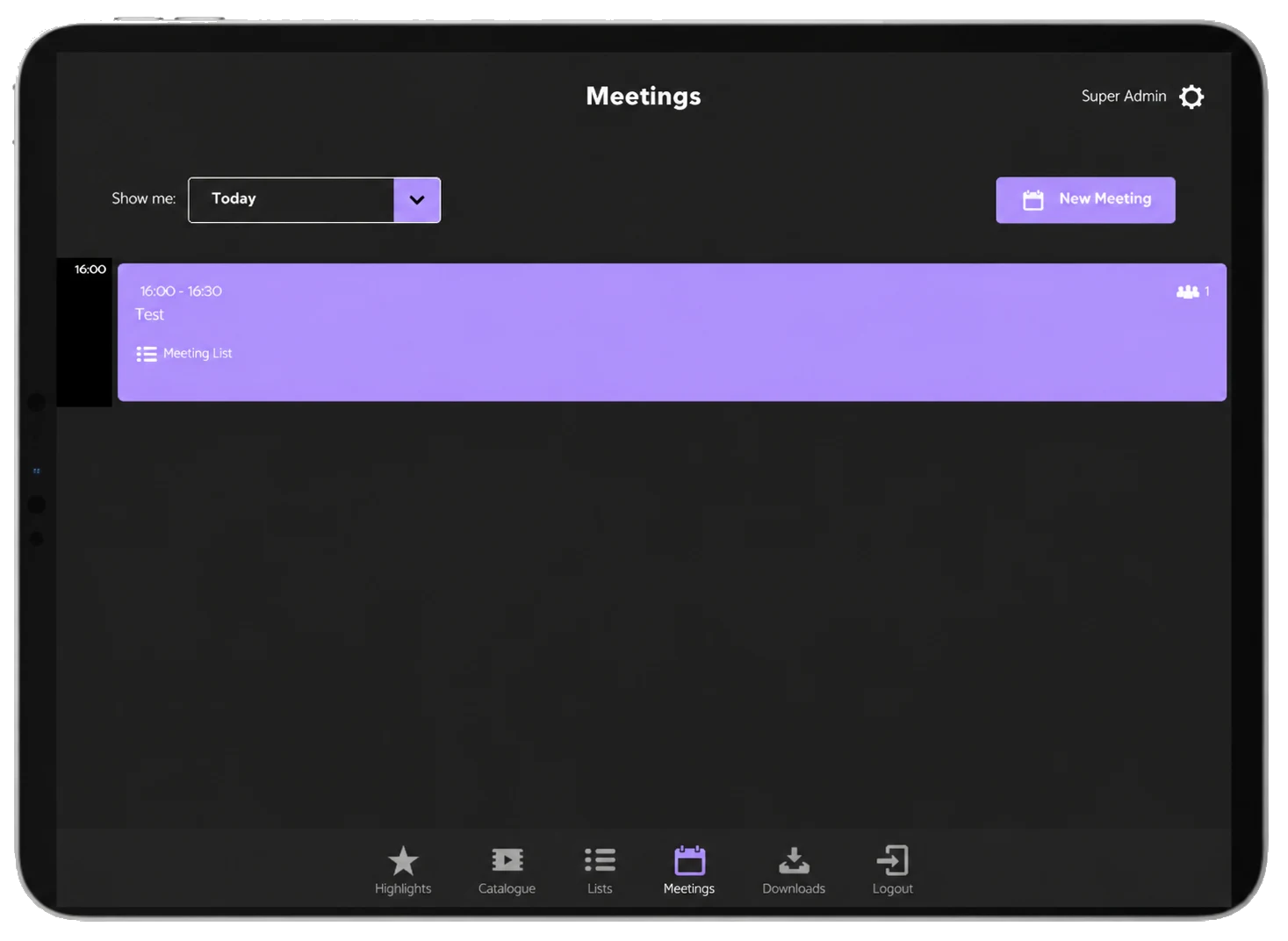
The day’s meetings in the ONE iPad app.
Notes taken in the room
Capture what the buyer said as they say it. Notes are timestamped and synced back to the website, ready for the follow-up.
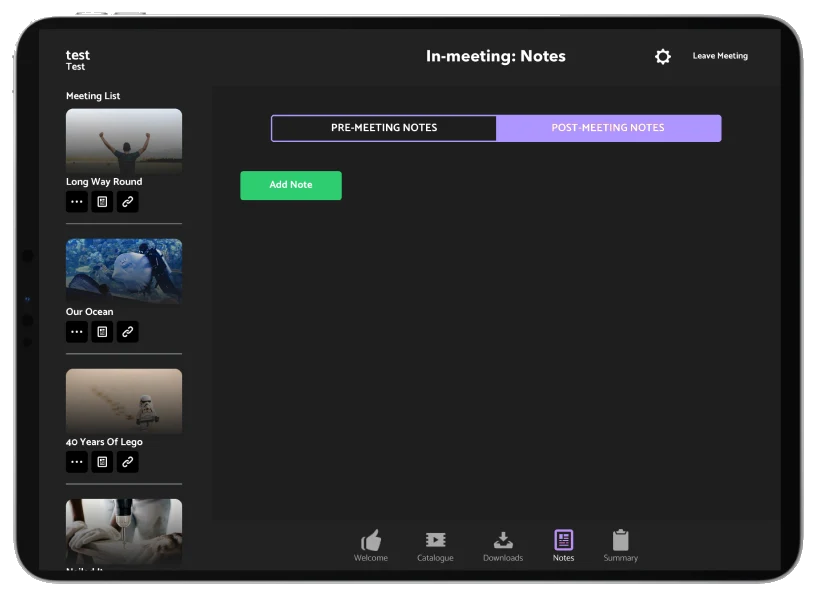
Meeting notes, timestamped and synced back to the website.
Your highlights, front and centre
Open on the titles you most want to sell, in your own branding, and play trailers without waiting for the Wi-Fi.
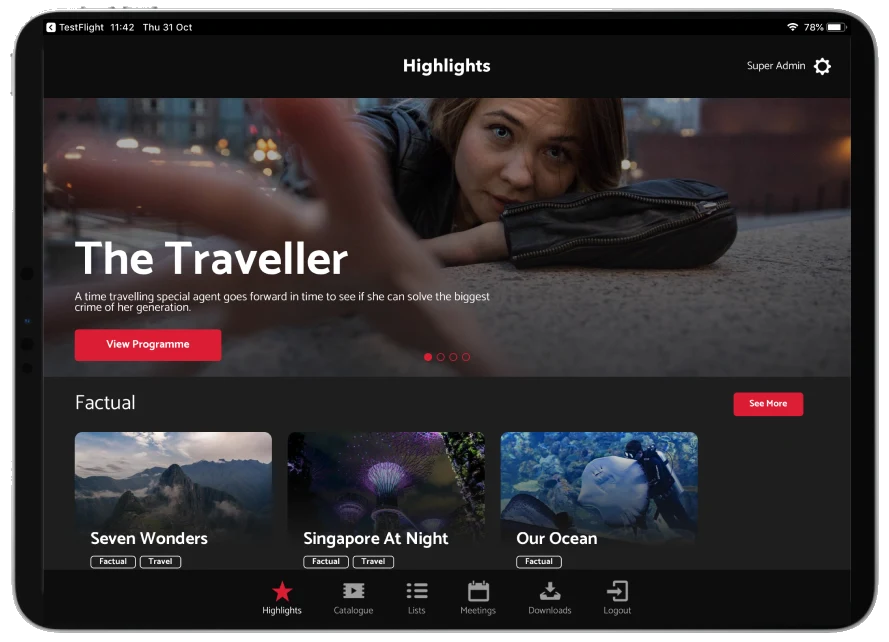
Highlighted titles, ready to play offline.
How it works
Four moves that make the market work harder
Put the whole slate in your bag
The app mirrors your ONE website: Highlights, the full Catalogue, Lists, Meetings and Downloads. Sync data, images and the videos you choose before you travel, and everything runs offline from then on.
Open with what matters this market
Set the app's Highlights for the event: a banner image, your headline titles, supporting text and PDFs. Build a list per buyer or territory and make it visible offline, so the right shows are one tap away.
Run the meeting from the meeting
Open the buyer's meeting, play trailers and episodes, and take notes as you talk. Your conversation and the titles you showed stay together, not scattered across a notebook and a laptop.
Follow up while you're still front of mind
Send a follow-up email with screener links from the meeting's Summary tab. Then watch Reporting to see who opened it and what they watched, and spend your time on the buyers who are leaning in.
Market prep
The night-before checklist
This is the routine our clients run before MIPCOM and every other market. Tick it off and see how ready your team is.
0 of 5 done
Update the app on every iPad
Make sure everyone is on the latest version before you sync.
Download promo videos only
Keep download lists to the trailers and promos you will actually show, so syncing is quick and storage stays free.
Make your lists visible offline
Your buyer and territory lists then open on the stand with no connection at all.
Turn off Auto-Lock
No screen going dark halfway through a trailer.
Poor venue Wi-Fi? Add local hosting
If the hall network is unreliable, optional QNAP local hosting lets your iPads sync from a device on your own stand instead.
And for your buyers
Give your best buyers the app too
There is a Buyer version of the app. External buyers log in with their own account and see only the titles they have permission to view, in your branding. The sales-only tools, like Meetings, are removed, so it is a clean screening room in their pocket.
Their catalogue, not everyone's
Permissions carry straight through from your ONE site.
Your brand on their home screen
A fully branded app that keeps your titles in front of them between markets.
Questions we get asked
Before you ask
What happens if there is no Wi-Fi at all?
Nothing changes. Once data, images and your chosen videos are synced, the app is designed to work fully offline. You only need a connection to sync updates.
Is the app included in every ONE plan?
The iPad sales app is an optional add-on to the ONE platform, fully branded to you. Ask us and we will show you how it would look with your catalogue.
Can buyers download our whole catalogue from it?
No. Bulk video downloads are a feature of your sales iPads. The Buyer version only shows what each buyer has permission to see.
Does it stay in step with our website?
Yes. The app mirrors your ONE site, so new titles, images and lists come through the next time you sync. There is no second catalogue to maintain.