
How to plan a market without the spreadsheet
A market stand is a small hotel: rooms, tables, meals and dozens of meetings an hour. Event Manager keeps all of it in ONE, next to the catalogue your team is selling.
In this guide
- Set the event up once
- Map your stand
- Invite everyone properly
- Learn and repeat
Before and after
The usual way, and the ONE way
Flip the switch to see what changes.
A spreadsheet of rooms
That three people edit at once.
Locations with capacity
Each room has a name, an internal nickname and a maximum number of attendees.
A side conversation
About which table is free.
Meal slots
Define meal times and link them to meal-enabled locations.
Calendar chaos
Wrong timezones, missing details.
One invite
Every attendee gets an email with a calendar file, in the event’s timezone.
Start again
From last year’s spreadsheet, if you can find it.
Duplicate it
Copy the event setup as a starting point for the next one.
How it works
Four moves
Set the event up once
Give the event a title, an internal contact and a timezone that every meeting and invite follows.
Map your stand
Add locations with capacities, flag the ones used for meals, and set daily stand opening times as guidance.
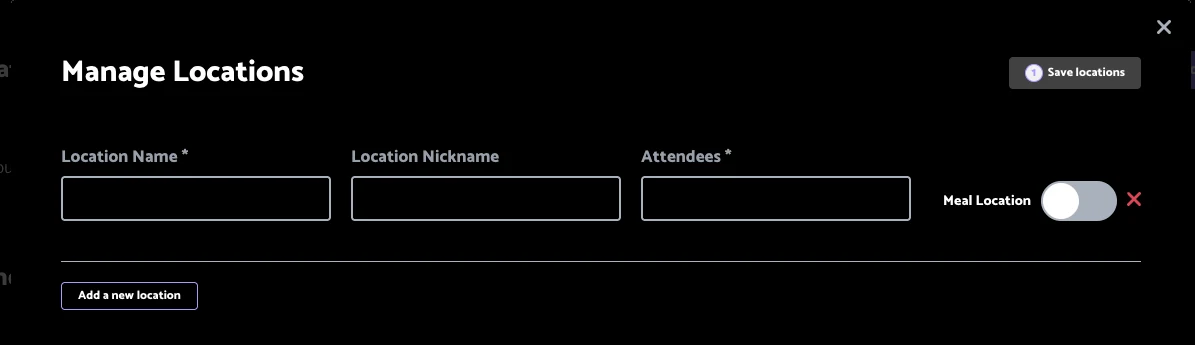
Manage Locations: rooms, nicknames, capacity and meal locations.
Invite everyone properly
Send invitations with a calendar attachment to all attendees in one go.
Learn and repeat
Review past events from the dashboard and duplicate an event to reuse its setup next time.
Questions we get asked
Before you ask
Can invites be sent more than once?
Invites are sent once per event, so check the details first.
Do stand hours block bookings outside them?
No. Opening times are guidance only.
Is Event Manager part of every plan?
It is an add-on to the ONE platform. Book a demo to see it with your next market.