
How to make your catalogue sell before you pick up the phone
Buyers judge a title in seconds, often late at night and in another time zone, long before they answer your email. ONE turns every programme page into a pitch that works around the clock.
In this guide
- Build the page once, use it everywhere
- Keep the synopsis public and the screeners protected
- Keep them watching
- Always show the next title
Before and after
The usual way, and the ONE way
Flip the switch to see what changes.
A one-sheet and a link
A PDF in one email, a Vimeo link in another, and no context on either.
One page, everything on it
Trailer, synopsis, seasons, episodes, images and talent on a branded programme page.
Email and wait
They ask for the deck, then wait a day for someone to send it.
Download it there and then
A Download PDF button on the page hands them the programme overview instantly.
The session ends too
Nothing tells them what to watch next, so they close the tab.
The next video starts itself
Autocue counts down and plays the next video in the programme.
A dead end
The page has nowhere else to send them.
Always another title
Related Programmes shows similar shows by genre, or ones you hand-pick.
How it works
Four moves
Build the page once, use it everywhere
Each programme holds its synopsis, trailers, seasons, episodes, images, talent and a programme PDF. Custom attributes let you describe shows your way, such as country of production, tagline or starring.
Keep the synopsis public and the screeners protected
Let anyone browse the catalogue and read the synopsis, while playback and production detail stay behind a login. A login prompt with your own wording turns curious visitors into registered buyers.
Keep them watching
Autocue plays the next video after a short countdown. Recommended Videos suggests more when one finishes, and only shows videos that buyer is allowed to see.
Always show the next title
Related Programmes adds a carousel of similar shows to every programme page. It works automatically by genre, or you can hand-pick the titles you want to push.
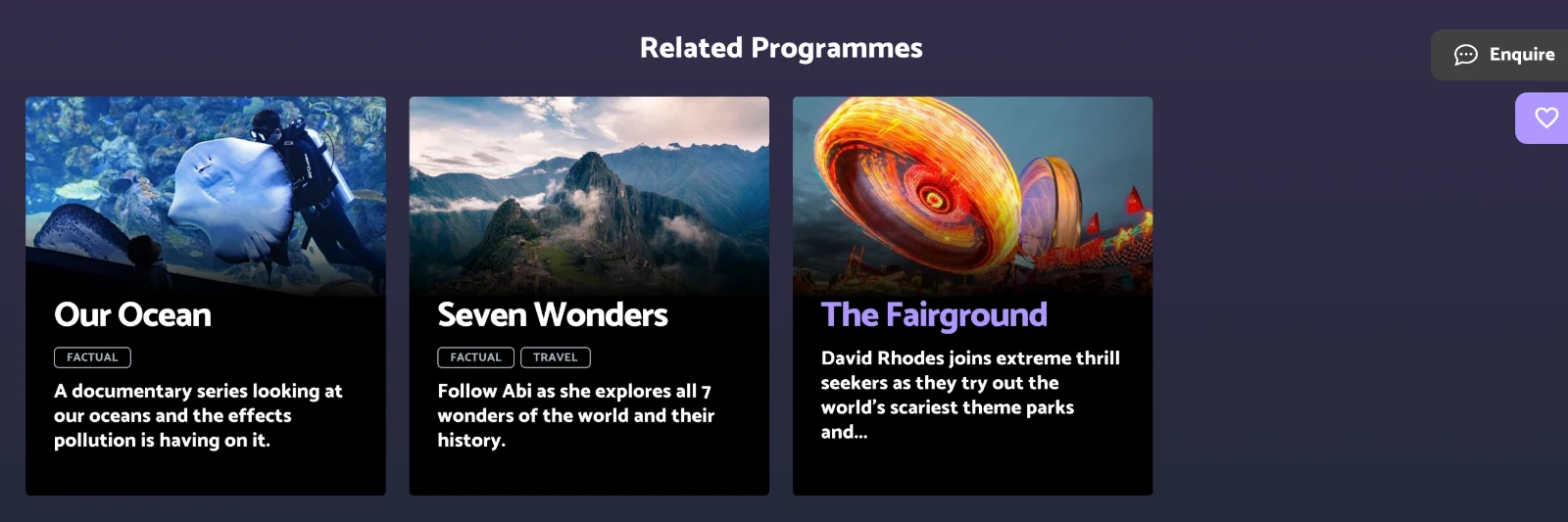
A Related Programmes carousel on a ONE programme page.
Questions we get asked
Before you ask
Do we need a developer to add a new show?
No. Your team adds a programme from the admin, then attaches images, videos, seasons and assets. A standard new title needs no developer.
Can some titles stay private while others are public?
Yes. Any programme, season, episode or video can be restricted to the buyers you choose, while the rest of the catalogue stays open to browse.
Can we describe shows the way we already do?
Yes. Custom attributes let you add fields such as country of production, tagline or starring, so pages match how your team talks about each title.